ERP is the design, configuration, testing and implementation of enterprise resource planning software to introduce an integrated system for important business activities, such as accounting, inventory, procurement, sales and reporting.
Successful ERP implementation can contribute to reducing confidence in spreadsheets, increasing visibility, standardizing workflows, and supporting management, to better serve more consistent information options for growing businesses in Pakistan. The actual schedules and costs were linked to the company’s size, the various modules, data migration, integration, functional differentiation and staff training.
Choose Before ERP software and identify your main operational issue. This can be accompanied by improper inventory data, delays in disclosure of financial information, double access or difficulty in recording sales across several sectors. This is the clear starting point for your implementation project.
Why Is ERP Implementation Important for Growing Businesses?
As a company expands, it becomes increasingly difficult to manage activities through certain spreadsheets and off-connected software. Financing may cover one number, the Warehouse can be another, and the sales team can be a third. Then workers will spend time to match information instead of using it to increase productivity.
The implementation of Enterprise resource planning ERP will pair these functions with standardised workflows by sharing data. A ERP system allows authorized employees to see the company more consistently to guarantee the correct configuration.
What Are the Main Benefits Introducing ERP?
ERP implementation’s benefits depend on how software complies uses business requirements effectively and how employees systematically use them. There are many operational improvements to a well-planned project.
1. Better Financial Visibility
The Integrated System can combine sales, purchases, expenditure and inventory activities with financial statements. This will help financial teams combine information with more consistent data and reports to collect.
2. Improved Inventory Management
ERP can support business on controlling stocks, profits, transfers, transfers and adjustments. Depending on the selected functionality, teams can monitor the inventory in different locations and detect discrepancies more effectively.
3. More Efficient Purchasing and Sales
Purchasing and sales workflows help workers access relevant procurement and storage data without an interaction with other departments. Approval requirements may also assist in monitoring procurement decisions.
4. More Consistent Business Processes
Standardised workflows provides information on how to conduct, check, approve and finalize transactions, which reduces confidence in individual employee working methods.
5. More Useful Management Reports
ERP dashboards and reporting can assist management with the management of sales, expenditures, inventory, balances and other operating standards, depending on implementation of modules.
6. A Foundation for Business Growth
If the system has the appropriate configuration and capabilities, the ERP platform can support additional users, locations and operations.
ERP software does not guarantee automatic profits growth, complete data or direct output improvements. Results are dependent on data quality, process design, roll-out, staff implementation and routine management of the system.
What Are the Five Main Stages of ERP Implementation?
The methodology used in the ERP implementation varies depending on the providers and the project, but most activities cover five major phases: planning, requirements and design, configuration and migration, testing and training, and further training.
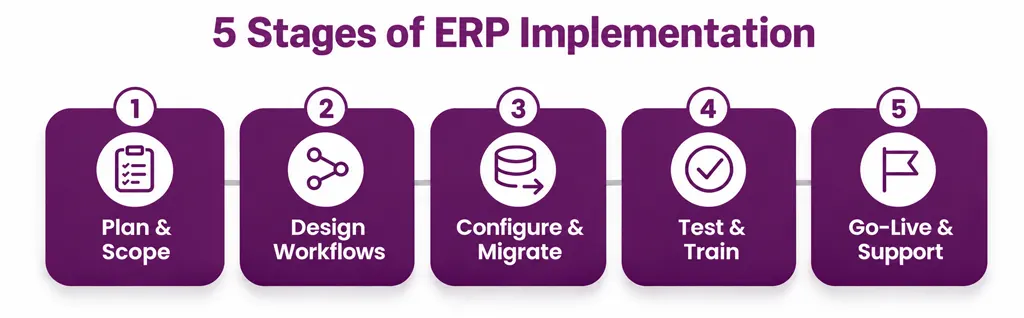
Stage 1: Planning and Project Scope
The company will decide why ERP will make use of its departments, its challenges, and what it will do.
The project team shall identify decision-makers, staff representatives, technical specifications, significant risks and pre-configuration commitments.
Example: The Trading Company The Pakistan can concentrate on recording, buying, inventory and assigning before setting to other modules.
Stage 2: Requirements and Workflow Design
Implementation Team will analyze the enterprise’s operation and identify processes to improve them.
This phase will require documentation of transactions, acceptance levels, reporting obligations, user roles and all major integration processes.
Map is a real transaction from beginning to end. Satisfy requests for procurement, e.g. with permissions, order of suppliers, receipt of goods, sellers’ invoices and payments. It will help the group to identify the missing steps and unnecessary duplicate before setting up to ERP.
Stage 3: System Configuration and Data Migration
ERP is designed in accordance with the approved specification. They could include enterprise configurations, users, privileges, funding mechanisms, inventory policy, company processes and reporting options.
We will need to check the data before the migration. This can include, depending on the company’s, information about customers, information about suppliers, property owners, a warehouse’s establishment, outstanding invoices and financial accounts.
Inaccuracy or Moving overlaps with the new ERP system might reproduce similar problems in another platform. Clean and verify all data until the last migration.
Stage 4: Testing and Employee Training
Testing is used to check if the configured system supports the company’s actual operation. Workers must test realistic scenarios, including regular transactions and exceptions.
Examples include incomplete deliveries, processing of sales announcements, correction of the fluctuations in inventory levels, authorization to acquire and carry out activities requiring further authorisation.
Training should be role-specific. Although financial users require training in accounting workflows and accounting, warehouse workers need to understand their stock operations.
Stage 5: Go-Live and Post-Implementation Support
The Go-live is where the company begins with OS ERP. The right to data collection, access rights, test results, user training, backup data. Support mechanisms was confirmed prior to the team should.
Their introduction and survey are based on choices that are based on their impact on their activities, and significant transactions are closely monitored within the Project team should.
Don’t treat go-live as if the finish line were going on. Consider this the beginning of a continuous improvement.
How Long Does ERP Implementation Take?
No timeline applies to every ERP project. Time’s length varies from number of modules to number of users, data quality, integration, adaptation, number of sectors, availability of personnel, and speed of decision making.
A project in which default workflows is restricted may be more easily implemented than using multiple locations in production, complete accounting and different external systems.
The implementation team must establish a project-specific schedule after assessing the enterprise’s needs.
What Can Extend the Timeline?
- Unclear or frequently changing requirements.
- Incomplete, inconsistent, or duplicated data.
- Extensive customization.
- Complex integrations with existing applications.
- Delays in approving workflows or configuration decisions.
- Insufficient time for user testing and training.
- Limited availability of key employees.
- Unresolved issues discovered close to go-live.
Please does not accept any timeline that is based on a number of employees, or just an estimation from a salesman. Ask for a schedule of milestones, dependency, customer responsibility, test time and authorization data.
How Much Does ERP Implementation Cost in Pakistan?
ERP implementation cost is dependent on software, scale, utility models, user numbers, required modules, migration, integration, adjustments, training and sustainable support.
On the basis of your actual needs rather than the employee’s likely expenses, a reliable estimation has to be made.
Please note that the Initial Low bids may not cover all the cost of ownership. Exceptions, adjustment fee, integration fee, regular subscriptions, incremental user costs and post-launch assistance should be examined prior to the comparison of proposals.
How to Prepare for ERP Implementation
Preparation is one of the most important components of the ERP implementation. Enterprises with clear responsibilities and data and business processes might be more effective in decision-making implementation.
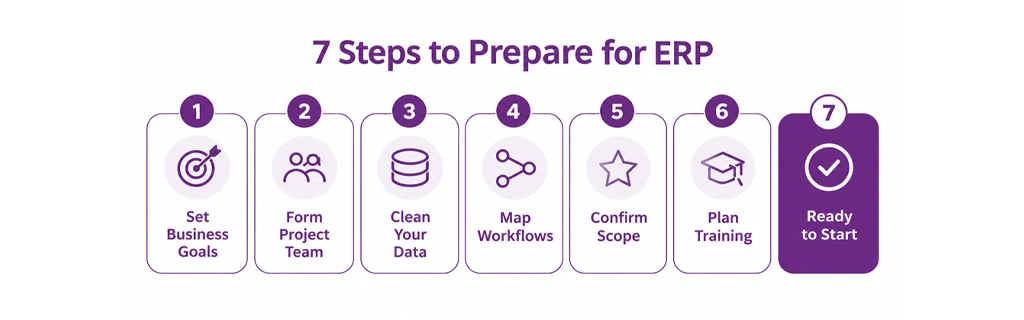
1. Establish Clear Business Goals
Determine what needs to be done to improve the project. Examples are decreased manual alignment, increased visibility of inventories, reduced reporting cycles and harmonised purchasing licence.
2. Appoint an Internal Project Team
Specify the implementing sponsor, Project Manager and the executive department representative. Give them the time and power of decision-making.
3. Review and Clean Existing Data
Identify the data to be migrated, delete duplicates, correct inconsistencies and confirm ownership of important files.
4. Document Existing Workflows
Record how Orders, Buying, Payments, Moving Inventory and Authorization work as they currently are. To identify the steps that are maintained, improved or repealed.
5. Confirm Scope and Priorities
Separate the essential requirements for optional extensions. This helps companies to concentrate on the most important business processes changes and manage implementation changes.
6. Plan Training and Communication
They’ll tell their employees why the company took ERP and how they changed their everyday responsibilities and got help. End-user participation before end of process.
7. Define Testing and Go-Live Criteria
We agree that what needs will be done before we begin our work, who will be looking into the priorities that will guide the prioritization of these issues and what contingency plans will need to be developed.
You will need to use the Go Live user-friendly checklist to obtain detailed preparatory work.
A Practical ERP Implementation Example for a Pakistani Business
Consider a hypothetical Pakistani distributor which features spreadsheets and separate accounting software that is able to control purchases, stocks and sales. The numbers of the stocks are not uniform and the financial staff invest in time reconciling transactions.
The company opted for the application of ERP to a controlled sequence.
Step 1: Assess Operation is now in effect. The team will look at how orders, receipts, warehousing payments, sales and payments will be recorded.
Step 2: Agree in terms of original scope. Accounting, purchasing, selling and inventory are the company’s most important priority since its processes are intimately linked.
Step 3: Prepare the data. The new system analyzes and maps commodity codes, supplier information, customer information, initial stock positions and balance sheets.
Step 4: Configure and test. The team will test out the complete workflow for the buy-to-payment process, along with a workflow collection of sales including returns and stock adjustments.
Step 5: Train users. Storage staff learn Warehouse Collection and transfer, Sale staff learn Order handling. The financial staff is informed of the financial management implications of transactional operations.
Step 6: Launch and monitor. According to go-live the company examines transaction accuracy, unsolved problems, inventory differences and quality management reports.
This example constitutes a possible implementation approach which is not documented as a SowaanERP client case study and which requires no particular savings or results.
Test Complete Business Journeys Workflow, not only single displays. While the purchase order may function in an appropriate manner on its own, the group should also monitor the receipt of the goods, note the invoice of the supplier, update the inventory and register financial transactions according to the plan.
Common ERP Implementation Mistakes and How to Avoid Them
Even the ERP platform may be complicated unless it is properly put into operation.
Mistake 1: Starting Without Clear Requirements
Therefore, The could be expanded through new divisional application applications that make monitoring of its scope difficult.
Avoidance: Document priority, eligibility criteria, commitments, and exceptions to configuration.
Mistake 2: Migrating Unclean Data
The importance of this is: Customer data related to Incorrect, commodity code, residues or storage items may affect transactions and reports.
Prevention: Clean data, migration control, balance sheets and authorization for those responsible.
Mistake 3: Over-Customizing the System
Why it’s important: The Excessive Change may enhance the complexity and maintenance requirements of the project for the future.
Assess can adjust the default configuration for preventing this before it is released for custom development.
Mistake 4: Ignoring Employee Training
It is important: Employees can avoid a system, add incomplete information and maintain informal tables.
To avoid it: training in specific roles of Provide; practical sessions; user guides; and available support.
Mistake 5: Rushing Go-Live
Because it’s important because a Unresolved error, or partial migration, could result in a critical failure of an operation.
To avoid this: Set clearly fulfils live criteria and provides important workflows to ensure a successful and verified user acceptance.
Mistake 6: Failing to Measure Results
The reason why this is important: The Company may not know whether the implementation improved the processes that it could drive.
To avoid this you need to: Record have basic implementation measurements and check the same indicators once launched.
How to Measure ERP Implementation Success
If the software is operational, it should not only measure the success of ERP in relation to its original business goals.
Depending on the project scope, useful indicators may include:
- Inventory accuracy.
- Time required to prepare management reports.
- Number of duplicate or incorrect records.
- Purchase order processing time.
- Invoice processing and reconciliation time.
- Frequency of manual corrections.
- Percentage of employees actively using the system.
- Number and severity of unresolved support issues.
- Achievement of agreed project milestones and budget controls.
The company shall determine the basic figures and shall agree on the method of calculating each measure.
Use the structured method to calculate your investment return to estimate the consequences of the costs.
“Measure the improvements ERP was selected to deliver, and review them consistently after go-live.”
Avoid a fixed repayment or reimbursement period without verifying the data that are provided for the project. Benefits and timing vary in terms of quality of the implementation, adoption, complexity of the process and the original location of the organization.
Which ERP Modules Should You Implement First?
As regards the solution that will depend on their workflow, the right starting point will be in view of business problems.
Common modules include:
- Financial management: Accounting, receivables, payables, and financial reporting.
- Inventory management system: Stock records, transfers, adjustments, and warehouse visibility.
- Procurement: Supplier records, purchase requests, approvals, and purchase orders.
- Sales management: Customer orders, invoicing, and sales reporting.
- Customer relationship management (CRM): Customer interactions, sales opportunities, and related information.
- Human resource management system (HRMS): Employee records and relevant workforce processes.
- Manufacturing and operations: Production planning, materials, work orders, and costing, where required.
See the ERP core modules available to understand what functions could be relevant to your company.
Start Planning Your ERP Implementation with SowaanERP
Success of ERP means more than creating software. This includes understanding business requirements, the development of reliable data, selection of proper implementation methodology, personnel training, and measurements that are based on operating performance.
A structured approach for the growing Pakistan companies can help reduce avoidable implementation risks and improve the way towards an integrated operation.
Explore SowaanERP to learn more about its ERP offerings and discuss your business requirements with the team. You can also speak with an implementation specialist to explore the next steps for your organization.
Plan around your business goals, validate every critical workflow, and make employee adoption part of the implementation from day one.
Plan Your ERP Implementation with SowaanER
Discuss your business requirements with our implementation team and map out the next steps for your organization.
FAQs
The ERP implementation is a mapping of the Enterprise Resource Planning Software Company configuration, testing, and deployment. It is data preparation, staff training, and live user support afterwards.
The time frames vary depending on the size of the company, modules, data quality, integration, individualization and employee availability. Instead of asking for an overall assessment, you will be asking for a specific project plan with milestones and dependencies.
These costs depend on licensing, registration, implementation, migration, integration, guidance, education, infrastructure and support. Ask suppliers to supply a specific quote to you in accordance with your requirements.
Planning, requirements and design, data configuration and migration, testing and training, as well as sustained support operation, are five broad phases. There may be several mechanisms available for those operations which individual service providers use.
ERP is the general process of implementation of the company. Customization is the changes of the software or expansions in order to meet specific requirements beyond certain functionality. There are no major changes that are involved in the implementation of each implementation phase.
Many projects remain ongoing with the Phased preparation, verification, data validation, and surveillance of Cutover in industry. However, disruption’s degree depends on the system, on the migration strategy and on operational requirements.
The data include customers and sellers, products, inventory information, outstanding invoices, financial statements and related trading information. On the modules and the migration plan, Coverage’s precise extent will depend.
If necessary, the ongoing sponsor, project leader, implementation specialist, department representative is usually required by the IT support project and the end users who can inspect daily working processes.
Yes. A phased approach would comprise modules, sections or sites. On account interdependence between processes and data management during the transition, the plan will be based.
Enterprises can track results, including accurate inventory data, deadlines for reporting, errors in operations, personnel recruitment, the effectiveness of processing and progress towards achieving project objectives. As established prior to implementation, the most useful indicators are measurable targets.