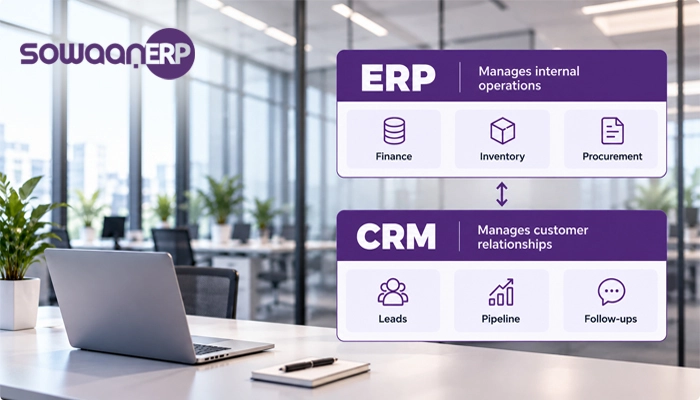
CRM was linked to customers, but ERP is Head of Internal Affairs. ERP software connects features including accounting, inventory, purchase and operations. CRM software allows businesses to open up, validate lines, control sales, regulate customer relationships, and improve follow-ups solutions.
Selecting the Pakistani businesses will depend on the problem you must face. The distributor may use ERP to fill business gaps, especially for a delay of financial reports. The sales group which was lost by the absence of tracks, calls, quotations and follow-ups can use CRM. Companies may need to completely resolve both problems.
Understanding the difference between ERP and CRM will help you invest in software that matches your actual needs, instead of adding one unplug tool to your business process.
What Is ERP Software?
Enterprise Resource Planning (ERP) software connects is a company which has a key role to play in the organization of the common system. Staff members could use the information available to the different services rather than having all the employees of the public administration which is involved in State contracts, inventories, invoices and invoices at their disposal.
Common ERP functions include:
Financial management:
Collection, administration and receipt of funds and accounts, as well as the preparation of financial reports.
Inventory management:
Trace Stock Levels, warehouse removals, Purchase and availability of shipments
Procurement:
Managing procurement requests, information about suppliers, and procurement
Sales and order management:
Linking bids, sales orders, transfers and accompanying notes.
Manufacturing and operations:
Coordination of the production, materials and equipment with the modules concerned
Reporting:
It will provide a summary of the results that will be achieved by managers.
The Karachi wholesaler could use different retail order stocks to cope with this situation. ERP can link sales orders to inventory, purchasing and quality assurance reports to enable employees to check the availability of the product and knowledge of the financial consequences of transactions.
For their own estimation, in needs assessments, undertakings should evaluate existing ERP modules. Which functions can influence growth.
What Is CRM Software?
The Customer Relationship Management (CRM) software supports the management of potential and existing customer transactions. It offers access to customer information, communication history, follow-up distribution and centralized business.
Common CRM functions include:
Lead management:
Register and monitor potential customers’ progress.
Contact management:
Maintenance of customer information and history of interaction.
Sales pipeline management:
Monitoring options range from preliminary inspection to closure.
Task reminders:
To help sales representatives keep the schedule.
Customer service:
Investigations, complaints and requests for support shall be initiated, whenever possible.
Sales reporting:
Start assessment of the pipeline operation, conversion’s rate, the performance of the Consider team – a Lahore software company which receives queries from its website, phone calls and social networking. One could forget to call the CRM, sales representatives follow-up center or center two times. CRM is a system which helps the team manage, assume responsibility for every Leader and react to actions.
Learn more about how CRM systems work to understand how customer information can support a more organised sales process.
ERP vs CRM: Key Differences at a Glance
ERP and CRM share information management and automation goals, but they focus on different parts of the business.
| Comparison | ERP Software | CRM Software |
|---|---|---|
| Primary purpose | Manage internal operations | Manage customer relationships |
| Main focus | Finance, inventory, procurement, and operations | Leads, sales, customer interactions, and service |
| Typical users | Finance, operations, purchasing, warehouse, and management teams | Sales, marketing, and customer service teams |
| Core data | Transactions, stock, purchases, costs, and business resources | Leads, contacts, opportunities, and communication history |
| Typical workflows | Purchase-to-payment, stock control, and financial reporting | Lead-to-opportunity, follow-ups, and customer support |
| Main business objective | Improve operational control and visibility | Improve sales organisation and customer engagement |
| Example problem solved | Stock records do not match physical inventory | Sales representatives lose track of potential customers |
One of these isn’t larger than one of them, the important difference between ERP and CRM. Each solves different business problems. The best option will depend on where your organisation is currently presenting its most inefficient inefficiency.
ERP versus CRM: Which Benefits Matter Most?
Although both systems can enhance productivity, these improvements have benefited from the different business processes.
Benefits of ERP Software:
- Better financial visibility:
Connected financial data help companies assess revenue, costs, commitments, and other key indicators.
- Improved inventory control:
Companies can monitor stock movements, replenishment requirements and product availability using suitable inventory functions.
- Less duplicate data entry:
Integrated processes reduce the need to place the same transaction in different individual systems.
- More coordinated operations:
Stores, shops, financial and distribution groups can be operated depending on the system configuration and the corresponding information permissions.
- Stronger reporting:
Such consolidated data will contribute to the evaluation of the management’s operational and financial activities.
Benefits of CRM Software:
- More organised follow-ups:
Sales representatives can document their next steps and transfer options via the pipeline.
- Better customer visibility:
Teams can check customer information and previous contact details before they contact their customers or existing clients.
- Clearer sales pipeline reporting:
Managers can see how opportunity builds, delays or demands vigilance.
- Improved team coordination:
Joint customer information reduces the risk that a number of staff members will be exposed to incomplete or contradictory information.
- More consistent customer service:
Once services are provided, teams may monitor questions and reply to them. Select Before Software, document three recurring problems every week with your team. Write down any problems that can be solved by the system. The result is a profit- and-loss-centre decision rather than the number of features presented.
ERP vs CRM for Pakistani Businesses: Practical Examples
The right system depends on industry, on how businesses work and on what difficulties they face.
1. Trading and Distribution Businesses:
Karachi or Faisalabad distributor may order merchandise from retailers, buy supply supplies from suppliers and monitor the sale of the loans. If staff members cannot validate supply supplies in the event of poor coordination between tenders and compatibility, ERP will probably be a priority.
CRM will be a valuable feature of a company where the same company requires control over connections between retailers, control over future accounts and the organization of a sales group that works across multiple fields.
2. Manufacturing Companies:
A manufacturer can require raw materials, production, procurement, accounting and coordination of the inventory management for Sialkot or Gujranwala. With the modules, ERP can connect internal processes.
CRM can help a commercial site through registration, monitoring offerings and communication with distributors or commercial customers.
3. Retail Businesses:
At different locations, for retail, ERP-related options for inventory coordination, procurement and accounting may be required. CRM may help in client reporting, sales opportunities and loyalty operations backed by an chosen platform.
Priority will be up to whether to monitor or involve customers, when faced with the immediate challenge.
4. Service-Based Businesses:
A consultancies provider or B2B may offer limited physical delivery, but can offer lots of active leads and customer relationships. CRM could be a better basis for the application management, follow-up and sales opportunities.
ERP can be more important if businesses are to control their internal accounts, purchases, projects, costs, etc. more effectively.
Which Should You Implement First: ERP or CRM?
The explicit rule for decision-making is to start with a system that addresses the biggest and most costly issue for most enterprises.
Choose ERP first if:
- Inventory records are unreliable.
- Purchasing and stock movements are difficult to coordinate.
- Financial reporting relies heavily on spreadsheets.
- Departments maintain separate transaction records.
- Management lacks a consolidated view of business operations.
Choose CRM first if:
- Leads are being missed or forgotten.
- Sales representatives lack a consistent follow-up process.
- Customer information is scattered across spreadsheets, inboxes, and messaging apps.
- Managers cannot clearly see the sales pipeline.
- Customer enquiries and opportunities are difficult to track.
Consider both if:
- Sales teams need accurate stock availability and pricing.
- Finance needs visibility into customer transactions while sales needs current account information.
- The business struggles with disconnected customer, inventory, and accounting records.</box>
Can ERP and CRM Together operating?
Yes. ERP and CRM could be used as independent, integrated applications or modules within a broader corporate governance platform.
CRM typically captures and manages customer-facing activity. ERP performs the business and financial processes necessary for executing orders and recording transactions. In cases where the system provided information, coordination on Customer Journey was improved among departments.
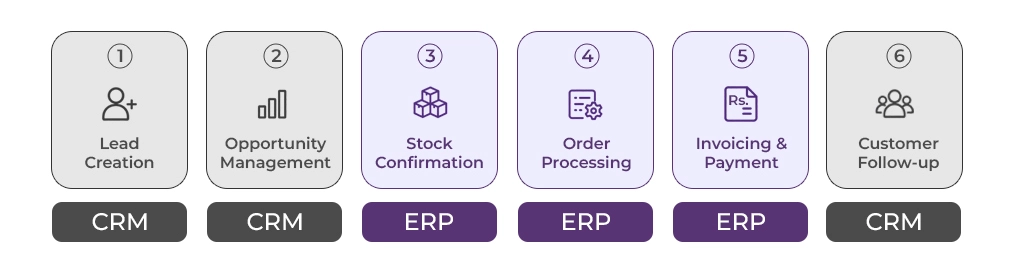
Consider a distributor receiving a large order from a new retailer:
- Lead creation:
The Sales Group will review the retailer CRM request.
- Opportunity management:
The Representative will monitor, measure and prepare the bid.
- Stock confirmation:
The inventory of ERP will help the team to check its availability.
- Order processing:
Once the order has been accepted, workflows will support information’s transfer needed to manage the order.
- Invoicing and payment:
The Financial Group will collect appropriate billing and payment information in ERP.
- Customer follow-up:
Sales may check customer status and schedule future appointments with integration related information.
This business process reduces input and helps teams to understand the post-win situation.
For a more detailed view of the relationship, explore how CRM and ERP working together can connect customer engagement with internal business processes. Integration does not mean all updates automatically are in front of the record. Ask the vendors about synchronisation frequency field mapping errors, double alarms, access rights. Which system constitutes each record’s authoritative source?
How AI comprises Change ERP and CRM Artificial Intelligence
AI in CRM:
AI-enabled CRM tools can be used to evaluate key indicators, revenue forecasts, short interviews, email and subsequent recommendations. These functions can help teams of suppliers prioritise their capabilities and at the same time provide reliable customer and sales information.
AI in ERP:
Depending on the delivery capacity of AI-enabled ERP, this option may help with the prediction of stocks, collecting billing information, identifying unusual transactions and memory. Such tools might improve the way employees can use information but financial and operational solutions may still require an assessment of individuals’ activities.
Why Shared Data Matters:
When ERP and CRM share information, analytical tools can connect sales with stock history or payment of a customer to the credit review workflows. He gives the team a complete picture more than any of these systems.
Whereas, for example, the operational team is suffering from a shortage of stocks, the representative of the supplier can make large purchases. Connected information can help the company to identify its problem before going further to involve more informed customers.
Clean Data Comes First:
Due to vague, double or outdated datasets, AI cannot adequately correct any problem. Businesses need to have consistent customer and product records specifying the system that is under control for any area, and test data synchronisation, before implementing the advanced automation system.
It’s also a IBM ERP and CRM comparison, showing how AI and Integration are influencing these business systems. Not assumes that each AI is included as described above in the relevant ERP or CRM product. Check out the details of the seller before picking the purchase.
How to Choose ERP and CRM Software in Pakistan:
After deciding on your claims to make, compare suppliers with business requirements rather than marketing requirements.
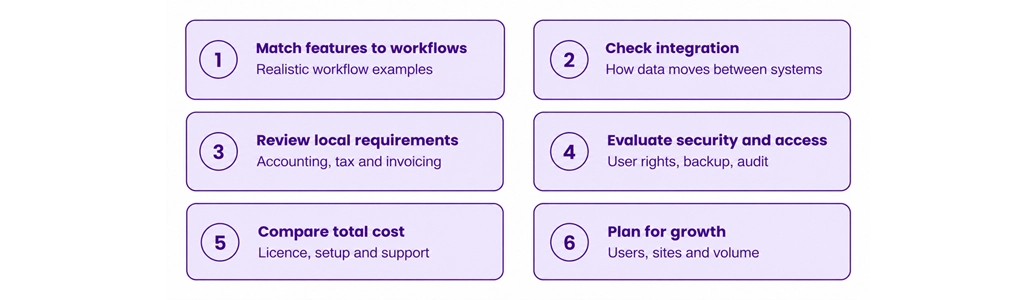
1. Match Features to Your Workflows:
To support this system, we need to have a list of processes: inventory, quotations, orders, sales monitoring, bills and invoices. Request suppliers to provide realistic examples in the workflow.
2. Check Integration Capabilities:
If you are going to use ERP and CRM, you would like to confirm how information on customers, products, offers, orders, invoices and details of payments are to be moved between systems. In order to assess whether integration is integrated or when such additional configuration is required.
3. Review Local Business Requirements:
Pakistani companies will need to assess the accounting, invoice, currency and tax processes associated with their organization. If you’re ready to review and confirm all the necessary features with your software provider, meet your business e-invoicing requirements Federal Board of Revenue. The official invoicing FAQs edition digital was released by FBR.
The purchase of ERP or CRM Software should not be accepted to ensure compliance. Decision-making and integration should come within the scope of meet your business requirements.
4. Evaluate Security and Access:
Check user rights, authentication options, backup, audit data sets and security approaches to business information. Workers have access only to data to accomplish their task.
5. Compare Total Cost:
Consider items such as subscription or licensing fees, implementation, migration, education, individualization, integration, support and future updates. Comparing the costs of the companies and their similar needs during the same period.
6. Plan for Growth:
Select a system that will be compatible with your intended users, location, volume of operations and complexity of the business processes. Avoid your functionality’s high cost that you currently lack, but make sure that the platform fits with real future requirements. Ask Every Supplier to show full workflow from beginning to end. In the case of ERP the order may supply a supplier’s invoice. This could be an important tool for continued efforts to close down CRM. If you want to see both systems, then ask for a demonstration of the link between both systems.
Common Mistakes to Avoid When Choosing ERP vs CRM:
Selection made through popularity: well-known platforms can not meet your team’s true needs.
CRM Inventory Emissions Settlement Order: CRM is able to serve the interests of customers and is capable of selling them, but there is no prospect that ERP System Inventory and Financial Audit will be replaced.
ERP purchase without sales tests: ERP may contain a number of features for customer management, but the depth of lead retention, distribution pipeline and customer retention tools will vary depending on the product.
Data Migration negation: Poor-quality spreadsheets can create a double client group, inconsistent product data and negative balances.
Underestimation employee training: Software that enables Even-enabled can provide no value unless employees understand new workflows or adhere to separate records.
Integration is automatic: Connected-Systems requires well-defined data ownership, compatible interfaces, tests and ongoing monitoring. Avoid only chooses software because it promises to do so. Ask what features are included in the package that additional modules must be installed in accordance with the third party integrations.
Make the Right ERP vs CRM Decision for Your Business:
The choice between ERP and CRM is one of the things that are needed first for your company’s improvement. ERP is a generally stronger starting point that is focused on financial transparency, accuracy of inventory, procurement and internal coordination. The CRM is usually a priority that must be borne in mind in administration, follow-up, customer profile and distribution pipe management.
If both areas are holding your business back, evaluate whether an integrated platform can connect customer-facing activity with operational and financial workflows. The correct solution should reflect your processes, provide precise information and promote growth without unnecessary problems.
Explore SowaanERP to learn more about its business management solutions, review the modules relevant to your requirements, and discuss your priorities with the team. If you are comparing ERP, CRM, or an integrated approach, talk to our team to discuss your business needs.
FAQs
ERP handles internal processes such as bookkeeping, inventory, purchasing and operation. CRM concentrates on information about clients, managers, customer engagement and distribution capabilities.
Sometimes. The ERP platform with CRM features can incorporate control options as well as management options. Companies that need pre-sale, marketing, or maintenance may prefer a specific CRM or an integrated combination.
Firstly, choose ERP as its main challenges are inventory, bookkeeping, purchasing, and operational control. You must first select CRM if you want more clues, inconsistent tracking and low visibility to sell.
There is no universal answer. The cost depends on suppliers, users, modules, implementation complexity, integration, training and ongoing support. In comparison with the licence costs, the ownership’s overall value is expressed.
A few products from CRM have limited functionality or connections to other systems. However, it should be examined whether ERP will be feasible for enterprises that are to be included in the comprehensive inventory and accounting workflows.
Some ERP systems include CRM modules for figuring out, probability and managing customers. If their available features comply with their sales team requirements, the depth of these skills will vary and companies will have to check.
Not always. A single system makes it possible for a small business to start simple workflows. Enterprises that require more effective internal operational control and structured customer management may benefit from both systems either via a comprehensive platform, or through networked applications.
Implementation time will depend on the software’s users, the quality of data, adaptation, integration and training needs. Ask for a project plan which is based on your specific scope rather than the general schedule.
Accounting software concentrates on financial transactions and accounts. ERP links accounting to other internal processes such as inventory and acquisition. CRM concentrates on customer to sales relationships and some platforms combine them.
When properly integrated, the system may exchange information about clients and transactions rather than input them manually. Companies still have the obligation to recognize ownership and to check accuracy of data that controls the compliance. Inspects errors in order to reach avoid duplication.