With the growth of businesses and hiring more employees in Pakistan, employee management is gradually becoming data-driven. The Pakistan Bureau of Statistics (PBS) reported that the labour force participation rate (LFPR) for Pakistan stood at 46.3% in 2024-25 and the average monthly wage was Rs. 39,042 and the unemployment rate was 7.1%. The country’s labour market also consists of both formal and informal workers in various industries, regions and in terms of their functions.
In a growing company, handling this staff is consistently more than just noting down who’s present or a calculation of the monthly salaries. HR departments should have accurate data for employee records, leaves, attendance, payroll, deductions, benefits, recruitment, performance, reporting and more. If employees are working in various departments, branches or locations, doing these tasks manually can make HR management even more complicated. A modern HR and employee management software can be useful here, allowing businesses to consolidate all their workforce data in one place, automate repetitive tasks, and make informed decisions based on real-time data.
For more detailed information on Pakistan’s latest employment and labour-market statistics, refer to the Pakistan Bureau of Statistics Labour Force Statistics.
An employee works overtime. HR updates attendance. The salary is adjusted for finance. Payroll calculates deductions. One person verifies the numbers. Someone else makes the payslips. Finally, the payroll details could require transferring to accounting.
Here’s where hr payroll software can help alter the process.
Businesses can integrate employee details, attendance and leave management, salary structures, deductions, payroll processing, and financial records in one place, rather than having separate tasks every month for payroll.
For Pakistani organizations, this importance increases even more when the solution is localized to the specific payroll needs in Pakistan and can be integrated with other business processes in the organization. The purpose of HR payroll automation is not simply to eliminate spreadsheets. It is to create a more consistent, controlled, and transparent process for managing employees and payroll from one place. Automate employee management, attendance, leave, payroll, and reporting with a connected ERP environment designed for growing Pakistani businesses.
Simplify HR and Payroll Management:
What is HR Payroll Software?
HR payroll software is an integrated solution that integrates human resource management and payroll tasks, enabling companies to handle employee data, attendance and leave, salary computation, deductions, and payroll reporting within a unified system.
Traditional payroll processes can include multiple activities that are not connected. HR is responsible for managing employee records, managers are responsible for authorizing leaves, attendance is tracked separately and finance is responsible for calculating the salaries.
These processes are linked together by an integrated solution.
For example:
Employee information → Attendance → Leave → Overtime → Salary calculation → Deductions → Payslip → Accounting
This creates a connected payroll workflow rather than requiring HR and finance teams to repeatedly enter the same information.
Modern hr and payroll management software may also include recruitment, onboarding, performance management, employee self-service, expense claims, and reporting.
According to SowaanERP’s Pakistan HR solution, the platform is designed to manage the employee lifecycle alongside payroll, taxes, attendance, and performance in one system.
Why Are Businesses Moving From Manual Payroll to HR Payroll Software?
Manual payroll becomes increasingly difficult as employee numbers increase.
A business with 15 employees might be able to maintain payroll using a spreadsheet. A company with 150 or 500 employees has a very different challenge.
Every additional employee can introduce another combination of:
- Basic salary
- Allowances
- Overtime
- Bonuses
- Deductions
- Leave
- Attendance
- Tax
- Benefits
- Loans or advances
- Reimbursements
The problem is not necessarily the number of employees alone.
It is the number of variables involved in calculating accurate payroll.
Common Problems With Spreadsheet-Based Payroll:
Businesses relying heavily on Excel may experience:
- Duplicate employee information
- Incorrect formulas
- Manual salary adjustments
- Delayed payroll processing
- Attendance reconciliation problems
- Difficulty tracking historical changes
- Limited approval controls
- Multiple versions of payroll files
- Poor audit visibility
- Increased dependency on individual employees
A spreadsheet can calculate payroll, but it does not automatically create a controlled HR process. Businesses should consider not only calculation accuracy but also approvals, access, data history, reporting, and integration.
Key Features of HR Payroll Software in Pakistan
The right hr payroll software in pakistan should cover more than salary calculation.
A useful system should connect the employee lifecycle with payroll and provide HR teams with a centralized source of information.
1. Employee Information Management:
Employee records are the foundation of payroll.
A centralized employee database can contain:
- Personal information
- Employment details
- Department
- Designation
- Joining date
- Salary structure
- Bank information
- Documents
- Leave records
- Attendance information
- Employment history
Instead of searching through files and spreadsheets, HR teams can access employee information from one location.
2. Salary Structure and Automated Calculations:
Payroll may involve basic salaries, allowances, bonuses, overtime, deductions, and other components.
An automated system can apply predefined salary structures and calculation rules to reduce repetitive manual work.
For example:
| Payroll Component | Example |
| Basic salary | Fixed monthly amount |
| Allowances | Transport, housing, medical, etc. |
| Overtime | Based on approved overtime |
| Bonus | Fixed or performance-based |
| Deductions | Applicable deductions |
| Advance | Monthly installment |
| Net salary | Final payable amount |
The exact payroll structure should reflect the organization’s employment policies and applicable laws.
3. Attendance and Leave Integration:
Attendance and payroll should not operate as completely separate processes.
If an employee’s attendance, approved overtime, or unpaid leave affects payroll, the information should ideally flow into payroll without repeated manual entry.
SowaanERP’s Pakistan HR solution describes attendance and leave integration as part of its payroll functionality, including integration with biometric or RFID attendance systems.
This can be particularly useful for organizations with:
- Shift workers
- Factory employees
- Retail staff
- Field teams
- Multiple branches
- Large workforces
4. Tax and Statutory Calculations:
Payroll processing often requires businesses to account for applicable tax and statutory deductions.
Pakistan’s Federal Board of Revenue provides current withholding-tax rate information, including a Tax Year 2027 rate card updated under the Finance Act 2026.
Because tax rules can change, businesses should ensure that their payroll software has a mechanism for maintaining current rules and that payroll teams verify applicable requirements. Software can automate calculations according to configured rules, but organizations remain responsible for ensuring that the rules, employee data, and payroll configuration they use are correct.
5. Payslip Generation:
Preparing individual payslips manually can consume significant administrative time.
An automated payroll platform can generate payslips based on the finalized payroll run and make them available through an employee portal where supported.
This can improve transparency because employees can review:
- Gross salary
- Allowances
- Deductions
- Net salary
- Leave-related adjustments
- Other applicable payroll information
6. Employee Self-Service:
Employee self-service reduces the number of routine requests HR teams have to process manually.
Depending on the platform, employees may be able to:
- View their information
- Request leave
- Check leave balances
- Review attendance
- Access payslips
- Submit requests
- Update selected information
This creates a more direct relationship between employees and the HR system.
7. Payroll Reporting:
Finance and HR managers need more than a final salary figure.
Useful reports may include:
- Payroll registers
- Salary summaries
- Deduction reports
- Department-wise payroll
- Employee cost reports
- Attendance reports
- Leave reports
- Tax-related reports
When HR and finance systems are integrated, payroll information can also contribute to broader financial reporting.
HR Payroll Software vs Manual Payroll: What Changes?
The biggest difference is not simply speed.
It is process control.
| Manual Payroll | HR Payroll Software |
| Employee data stored across files | Centralized employee records |
| Attendance manually reconciled | Attendance can feed payroll |
| Salary calculations may use spreadsheets | Configured calculations |
| Manual payslip preparation | Automated payslip generation |
| Limited audit visibility | Better transaction history and controls |
| HR and finance may work separately | Integrated workflows |
| Difficult to scale | Designed to scale with employees |
| Reports require manual preparation | Automated or on-demand reports |
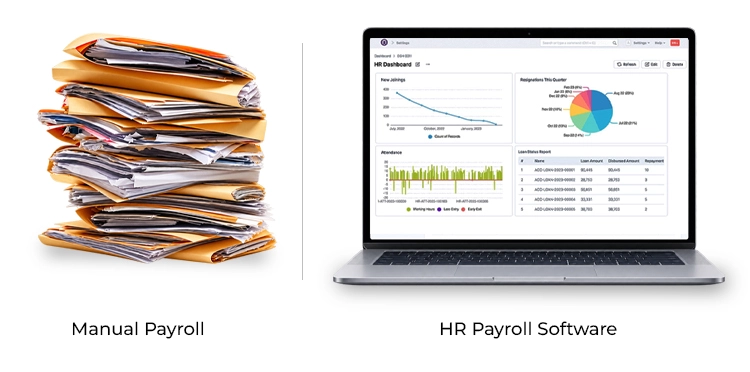
The objective is to move from:
People → Spreadsheets → Calculations → Manual checking
to:
Employees → Centralized HR data → Automated workflow → Payroll → Reports
Cloud Based HR and Payroll Software: Is It Better?
For many growing organizations, cloud based HR and payroll software offers greater flexibility than systems installed on individual computers.
Cloud deployment allows authorized users to access the system through an internet-connected environment rather than depending on a specific office computer.
This can be useful for businesses with:
- Multiple branches
- Remote HR teams
- Employees working across locations
- Mobile managers
- Distributed operations
SowaanERP describes its Pakistan platform as cloud-based and designed to provide access to business information across locations.
Cloud vs On-Premise HR Payroll:
| Factor | Cloud | On-Premise |
| Infrastructure | Provider-hosted | Business-managed |
| Accessibility | Internet-based access | Usually network/device dependent |
| Maintenance | Primarily provider-managed | Internal IT responsibility |
| Updates | Generally easier to deploy | May require internal deployment |
| Scalability | Easier to expand | Infrastructure may need expansion |
| Remote access | Stronger fit | Requires additional configuration |
However, cloud does not automatically mean secure.
Businesses should evaluate:
- Access controls
- User permissions
- Authentication
- Backups
- Encryption
- Vendor security practices
- Data retention
- Integration security
Do not choose cloud software simply because it is cloud-based. Evaluate the provider’s security controls, support model, backup strategy, access management, and ability to meet your organization’s operational requirements.
How HR Payroll Software Helps Small Businesses
Small businesses often assume payroll automation is only necessary for large organizations.
That is not always the case.
Payroll and HR software for small business can be valuable when the owner or HR team is spending too much time managing repetitive administrative work.
For a small company, the benefits may include:
- Faster payroll processing
- Fewer repetitive calculations
- Centralized employee records
- Easier attendance management
- Better leave tracking
- Professional payslips
- Employee self-service
- Easier reporting
- Reduced dependency on individual spreadsheets
The key is choosing a solution that is not unnecessarily complicated.
A small business does not need an enterprise platform simply because it has payroll requirements.
It needs a system that can solve its current problems and scale as the company grows.
How HR Payroll Software Supports Growing Businesses
Growth introduces complexity.
A company may start with one office and eventually operate across:
- Karachi
- Lahore
- Islamabad
- Faisalabad
- Multan
- Other cities or regions
Payroll may also become divided between departments, business units, or branches.
A centralized hr payroll software system can help standardize processes across these locations.
For example, management can establish consistent rules for:
Employee records → Attendance → Leave → Payroll → Reporting
while still allowing individual branches or departments to have appropriate configurations.
SowaanERP’s HR solution supports multi-location and departmental payroll from a centralized environment.
Connecting HR Payroll With Accounting and ERP
Payroll is not isolated from the rest of the business.
Salaries represent a major operating expense and therefore affect accounting and financial reporting.
When payroll and accounting are disconnected, finance teams may need to manually transfer payroll information into accounting records.
This creates another opportunity for errors and delays.
An integrated ERP approach can connect:
HR → Payroll → Accounts → Financial Reporting
For example, payroll information can be associated with departments, cost centers, branches, or business units where the system supports these structures.
SowaanERP’s accounting module includes account dimensions for segments such as branches and business units, providing a structure for more detailed financial management.
You can also explore payroll and accounts integration as part of a broader ERP setup.
HR Payroll Software and Attendance Systems
The payroll team may need to account for:
- Regular attendance
- Late arrivals
- Early departures
- Overtime
- Absences
- Approved leave
- Shift schedules
If this information is entered manually into payroll, HR teams spend significant time reconciling records.
With appropriate integration, biometric or other attendance data can feed the payroll workflow.
This can reduce duplicate data entry and make the payroll process more consistent. Before integrating an attendance device, define how attendance events should translate into payroll. For example, determine how overtime, missing punches, approved leave, and late arrivals should be treated before automating the workflow.
Managing Employee Loans, Advances and Deductions
Employee advances and loans are another area where spreadsheets can become difficult to manage.
A payroll system can potentially maintain:
- Original advance amount
- Approval status
- Installment amount
- Remaining balance
- Deduction schedule
- Payroll impact
Instead of manually checking whether an employee’s installment has already been deducted, the system can use configured payroll rules and workflows where supported.
This is particularly useful for businesses with large numbers of employees receiving salary advances or other recurring deductions.
HR Payroll Software for Different Pakistani Industries
Payroll requirements differ from industry to industry.
Manufacturing:
Manufacturing organizations often have shift-based employees and large workforces.
Important requirements may include:
- Biometric attendance
- Shift management
- Overtime
- Allowances
- Departmental payroll
- Cost-center allocation
- Employee records
Retail:
Retail businesses may operate multiple branches with employees working different schedules.
Useful capabilities include:
- Branch-wise employee management
- Attendance
- Shift scheduling
- Leave
- Payroll
- Employee self-service
Healthcare:
Hospitals and clinics may have:
- Multiple employee categories
- Shift workers
- Doctors
- Nurses
- Administrative employees
- Overtime
- Different compensation structures
A centralized HR system can help organize these workforce records.
Education:
Education organizations, colleges and schools can have control of:
- Teachers
- Administrative staff
- Support employees
- Attendance
- Leave
- Payroll
- Contracts
Construction:
- Employees of construction jobs may be involved in different projects or different building locations.
- Employee information might need to be linked to the HR system with:
- Projects
- Departments
- Attendance
- Allowances
- Overtime
- Cost centers
But the main thing to keep in mind is that the best hr and payroll software does not always have the most features.
It’s the one that aligns with the workforce model of the organization.
When selecting HR payroll software, what should companies consider?
When it comes to selecting payroll software, the first step should be to consider the needs of your business, not the features of the software.
1. Identify Current Problems:
Ask:
- What are payroll mistakes being made?
- How much time does it take to do payroll?
- What is the work done by hand?
- What is the process used to record attendance?
- Employee records are kept where?
2. Define Required Features:
Look for the features that you really require.
For example:
- Payroll
- Attendance
- Leave
- Recruitment
- Employee records
- Performance
- Employee self-service
- Reporting
3. Review Local Requirements:
Make sure the system can accommodate the payroll rules, tax requirements and statutory procedures applicable to your organization.
4. Evaluate Integration:
Determine if the software can communicate with:
- Accounting
- ERP
- Attendance devices
- Banking workflows
- Other HR applications
5. Test Reporting:
Don’t just test the payroll calculation.
Request the vendor to show you the type of reports your finance and HR teams use.
6. Review Security:
Evaluate:
- User roles
- Permissions
- Audit history
- Backup
- Data protection
- Authentication
7. Consider Scalability:
System must accommodate the anticipated growth.
The number of employees must not be a reason for a company to replace its payroll system.
If you are considering implementation methodology, the HR payroll software best practices resource offers more context about the HR/ERP integration.
What is the price of HR Payroll Software in Pakistan?
The price of hr payroll software is not fixed as its implementation varies due to the requirements.
Cost can depend on:
- Number of employees
- Number of users
- Payroll modules
- HR modules
- Attendance integration
- Customization
- Data migration
- Implementation
- Training
- Support
- Hosting model
- Additional integrations
Ask for a full price break up before buying. Initial software cost may be low but extra integration, customization, migration and/or support can be costly.
So, What’s the ROI of Payroll Automation?
ROI doesn’t happen magically when software is bought; payroll automation requires ROI.
It is the return from the improvement of the process.
For instance, consider an HR team that invests some working days every month:
- Collecting attendance
- Checking leave
- Updating spreadsheets
- Calculating salaries
- Correcting errors
- Preparing payslips
- Preparing reports
Some of this administrative work can be potentially reduced with automation.
The business can assess ROI using:
- Payroll hours saved
- Reduced correction time
- Reduced manual reporting
- Improved employee self-service
- Reduced operational delays
There are a number of errors that can ruin a payroll project.
Buying the software is the easy part. Most payroll projects don’t fail because the tool was wrong. They fail because of how it was rolled out.
The same handful of mistakes shows up again and again, in businesses of every size.
Knowing them ahead of time is half the battle
Mistake 1: Dirty Data Migration:
Where existing employee records have duplicate or inaccurate data, the transfer of this data to the new system can inadvertently bring the issue with it.
Mistake 2: Automating a Broken Process:
Don’t confuse a bad workflow with a good one automated.
Check process before configuring.
Mistake 3: Not Taking Payroll Testing:
Schedule test payrolls prior to going live.
Compare:
Previous payroll outcome – New payroll outcome
and investigate differences.
Mistake 4: Not training users:
HR teams and managers must have a clear understanding of the functioning of the new system.
Mistake 5: Over personalization:
Too much customization may lead to higher costs and less ease of upgrade in the future.
Mistake #6: No Clear Ownership:
One person should be designated as the payroll configuration, employee information, approvals, and system administrator.
Mistake 7: Forgetting Employee Adoption:
When employees are asked to unlock their own doors, inform them of the switch and give them easy instructions. Don’t run your first payroll run on the first production test of the system. When taking the leap from spreadsheets or legacy systems, parallel or controlled testing is key.
A step-by-step practical guide to HR Payroll implementation.
These are the steps that can be followed with a structured implementation:
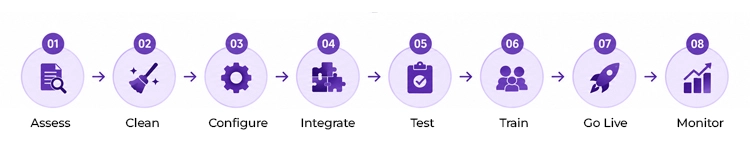
Step 1: Assess:
Record existing HR and payroll procedures.
Step 2: Clean:
Check employee record books, salary-sheet, attendance register etc and leave balance.
Step 3: Configure:
Create departments, salary structures, payroll rules, approvals and permissions.
Step 4: Integrate:
Integrate attendance, accounting, ERP or any other system you may require.
Step 5: Test:
Execute sample payrolls and compare with calculated payrolls.
Step 6: Train:
To train HR, Finance, Manager and employees as per their role.
Step 7: Go Live:
Switch to the new payroll process on validation.
Step 8: Monitor:
In the initial cycles check errors, user feedback, reports, payroll results etc.
This helps ensure that the implementation is a controlled business transformation, and not a software install.
Best Practices for HR Payroll Software in Pakistan
Businesses can improve their payroll automation projects by following a few principles.
Keep One Employee Record:
Avoid maintaining separate employee information in multiple systems whenever possible.
Standardize Payroll Rules:
Document how salary components, deductions, overtime, and allowances are calculated.
Control Access:
Employees should only have access to the information appropriate for their role.
Maintain Auditability:
Payroll changes should be traceable wherever the system supports audit history.
Review Payroll Before Approval:
Automation should reduce manual work, not remove appropriate review and authorization.
Keep Rules Updated:
Tax and statutory requirements can change. Payroll configurations should therefore be reviewed periodically.
Integrate Instead of Re-Keying:
If attendance and accounting systems can integrate with payroll, avoid unnecessary manual data transfer.
What Does the Future of HR Payroll Software Look Like?
HR technology is moving beyond basic payroll calculation.
Modern platforms are increasingly combining:
- Automation
- Analytics
- Employee self-service
- Mobile access
- Cloud infrastructure
- AI-assisted insights
- Workforce planning
- Integrated ERP systems
AI can potentially help HR teams identify workforce trends, analyze payroll costs, assist with reporting, and support workforce planning.
However, AI should complement—not replace—appropriate human review, particularly when dealing with compensation, employee records, and sensitive workforce decisions.
The broader direction is toward connected workforce management.
Instead of having separate systems for:
HR + Attendance + Payroll + Accounting + Performance
businesses increasingly want a connected environment.
SowaanERP follows this integrated ERP model, with HR, accounts, CRM, stock, buying, projects, and other business functions available within its broader platform.
Explore HR Software in Pakistan With SowaanERP
Businesses looking for HR software in Pakistan can use an integrated platform to manage employee information, payroll, attendance, leave, recruitment, performance, and related HR workflows.
SowaanERP’s HR and payroll solution is positioned for Pakistani businesses and includes salary structuring, automated payroll calculations, attendance and leave integration, payslips, multi-location payroll, and employee self-service.
For organizations looking beyond payroll alone, the HR and payroll management software capabilities can bring broader HR processes into the same ERP environment.
Final Thoughts: Build a More Efficient HR and Payroll Process
Payroll is one of the most important recurring processes in any organization.
Employees expect salaries to be accurate and on time. Finance teams need reliable payroll information. HR needs accurate employee records. Management needs visibility into workforce costs.
When these requirements are managed through disconnected spreadsheets, the process becomes increasingly difficult to control as the organization grows.
HR payroll software provides an opportunity to bring these processes together.
From employee records and attendance to leave, salary structures, deductions, payslips, reporting, and accounting integration, automation can create a more connected payroll workflow.
For Pakistani businesses, the right solution should also reflect local requirements and provide the flexibility needed to support different industries, workforce structures, branches, and growth stages.For organizations specifically considering cloud deployment, learn more about cloud based HR and payroll software.
And for growing SMEs, the payroll and HR software for small business approach can help businesses evaluate scalable ERP options.
The goal is not simply to replace Excel.
It is to build a payroll process that is:
Accurate → Connected → Transparent → Scalable → Easier to Manage
The best HR and payroll system is the one that fits the organization’s actual processes, integrates with the systems it already uses, supports future growth, and gives HR and finance teams greater control over employee and payroll information.
Ready to Modernize HR and Payroll Management?
Bring employee records, attendance, leave, payroll, performance, and financial processes together in one integrated ERP environment.
Frequently Asked Questions About HR Payroll Software in Pakistan
The process of manual payroll tends to involve a lot of spreadsheets, paper records, and repetitive calculations. HR payroll software brings the employee data into one place and can automate salary calculations, attendance, leave, deductions, payslips, and reporting.
Yes, especially if payroll administration and employee management take up a lot of time, or if spreadsheet-based procedures are getting out of hand. The answer ought to be befitting the company.
Yes, it’s possible to use payroll systems to determine salary calculation and deductible set-up according to salary structure and rules. Businesses should make sure that those configurations represent their policies and requirements applicable.
Yes if the software can integrate. Integrated ERP may link HR and payroll to accounting, enabling payroll data to feed into financials and reports.
Yes. Today’s HR systems can integrate attendance and leave management with payroll processes. For instance, SowaanERP’s Pakistan HR and payroll features include attendance and leave integration.
Security is determined by infrastructure used by software provider and the configuration of the organization. Access controls, user permissions, authentication, backups, encryption, audit trails and data-management practices should be considered.
Yes, there are appropriate systems that will accommodate multi-location or departmental payroll. This enables them to streamline their payroll management at a central location while ensuring proper branch level setups.
Ongoing costs may also involve software subscriptions or licensing, support, maintenance, integration, adding users and customization, and future training. Businesses must ask for a full total-cost estimate before implementation.
Implementation time is dependent on the number of employees, quality of data, complexity of payroll, integrations, customization, and training needs. A simple implementation can be much quicker than having multiple branches and integrations.
Yes. Manual employee recordkeeping, attendance and leave management, payroll calculations, payslips, and reporting can be tedious and reduced using automation.
Check employee records, salary scales, records of past salary and leave details, deductions, bank details etc. needed by the business. The data to be migrated should be cleaned for duplications/inaccuracies.
Cloud deployment may be appropriate for companies looking for central control, scalability, and lower reliance on local infrastructure. But before choosing, the security, availability, support, access control and vendor reliability need to be assessed.